Lightweight app for Linux server management over SSH.
Written in Rust+Tauri, Serverbox uses SSH to give you live dashboards, a real terminal, file management, Docker, services, cron, users and firewalls. Connect over the credentials you already have. Install nothing on your servers.
Features
Everything you do over SSH today — with a face on it.
Serverbox speaks plain SSH to your machines. Whatever works in your terminal works in Serverbox, presented as tools you can actually click.
Connect & organize
▦Multi-server workspace
Save as many servers as you need. Group them, tag them, mark favorites, and find anything instantly with server search — including your own private notes for each machine.
❐Browser-style tabs
Open multiple workspaces side by side, drag to reorder, rename tabs, and keep several tabs on the same server for different tasks. Terminal sessions stay alive while you switch.
⇄Bastions & jump hosts
Reach machines behind bastions with full jump-host chaining. Every hop authenticates independently and verifies host keys, so nested networks just work.
🔑Password or key auth
Use passwords or private keys. Serverbox discovers your existing SSH keys and can import hosts straight from your ~/.ssh/config — no re-typing what you already have.
🔐Encrypted credential vault
Passwords, passphrases and sudo secrets are encrypted locally behind a master password. Resetting it is explicit and clearly warned as unrecoverable — by design.
✓Host-key verification
Server fingerprints are reviewed on first contact and re-checked on every connection. A changed key is never silently accepted.
Monitor & understand
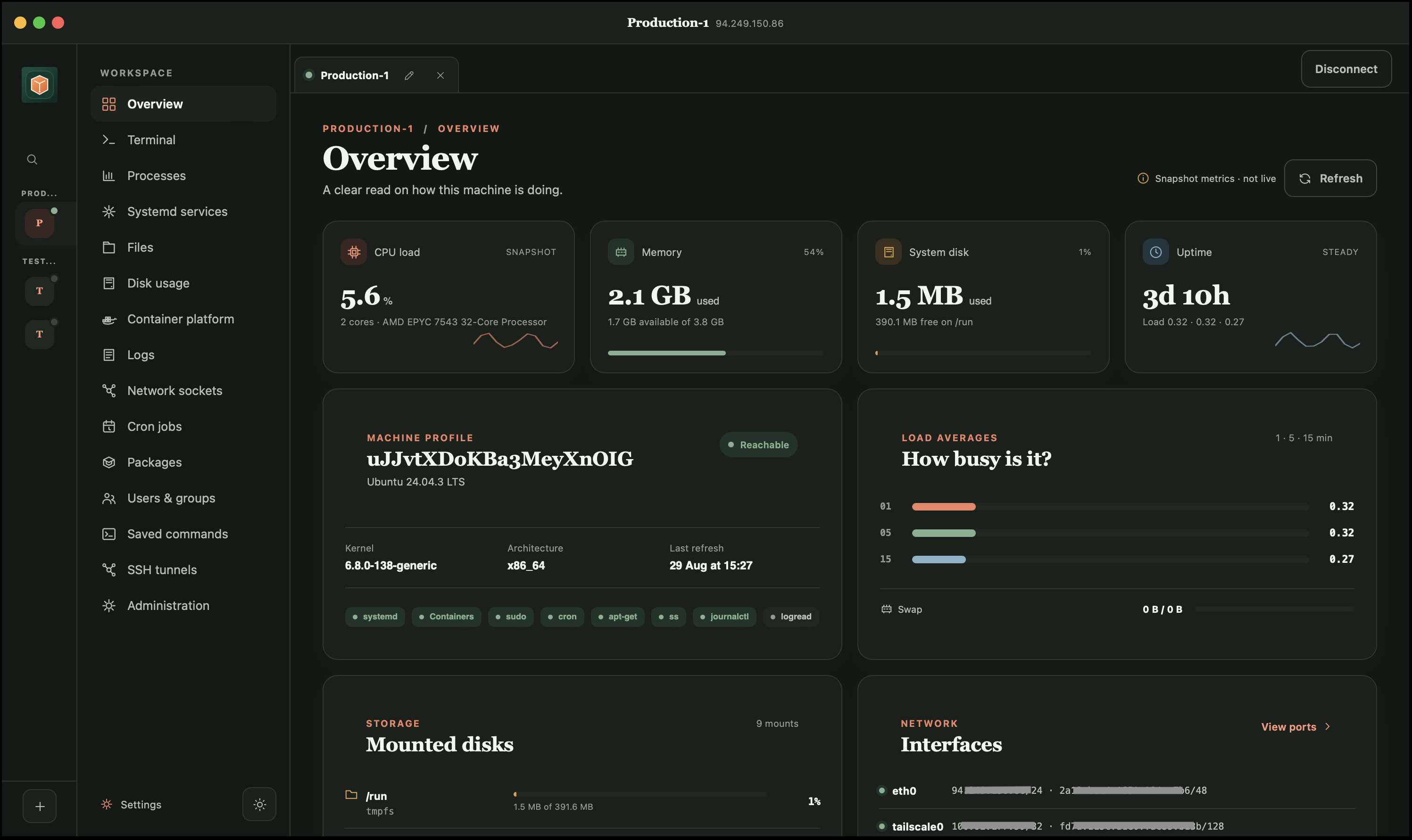
◉Live server overview
CPU, memory, swap, disks, network interfaces, uptime and load — a clean snapshot of every box the moment you connect.
≔Processes
See what's eating CPU and RAM, sort and search, then stop a runaway process gracefully — or force-kill it when it won't listen.
⚙Services
Start, stop, restart, reload, enable or disable services, with logs and details one click away. Works with systemd — and without it.
▤Disk usage explorer
Find what's filling the disk: largest files and folders, per-mount usage, inode pressure, container disk usage, and a breakdown of log directories.
☰Unified logs
Journals, system logs, container logs, Compose services or any raw file — one viewer with search, severity filters and live streaming you can pause.
⇋Network view
Listening ports and active connections at a glance, so you always know what a server is exposing and who it's talking to.
Terminal & files
❯A real terminal
A proper interactive terminal with tabs, copy/paste, sudo and reconnect. Sessions survive hiccups and wait for you, not the other way around.
⌘Saved commands
Keep your frequently-typed commands one click away — restart recipes, health checks, log greps — per server or across them.
🗂File manager
Browse, upload, download, edit and organize files with permissions and ownership visible. Big transfers can be cancelled mid-flight — cleanly, without leaving half-written files behind.
✎Quick edits
Open a config file, fix a line, save it back — no vi gymnastics required (though the terminal is always there if you miss them).
🕳SSH tunnels
Save and run local, remote and SOCKS5 tunnels as first-class citizens. Tunnels are tightly bound to their server connection and stop when its credentials or connectivity change.
🗒Server notes
"Reset MySQL via runbook #4", "billing box — don't reboot". Notes live with each server profile and show up in search when you need them.
Containers & Compose
🐳Container control
Containers, images, volumes and networks with live resource usage. Start, stop, inspect, pull and create — across Docker and Podman.
❯Container shells
Jump straight into a running container with a dedicated shell. Shell-less and minimal images are detected and handled honestly instead of failing cryptically.
⧉Docker Compose projects
Your Compose projects are discovered automatically: services, dependencies, environment variable names, scaling, rebuilds and pulls — with logs per service.
▥Container logs & stats
Follow container output live, filter by severity, and watch CPU and memory per container — all in the same log viewer as everything else.
Administration
⏰Cron manager
Add, edit, pause and delete your cron jobs with human-readable schedules and next-run previews. System cron files are shown read-only, so nothing gets clobbered.
📦Package management
Full package management on Debian and Ubuntu: search, inspect, update, install, remove and upgrade. Update and security status is understood across the other major distro families too.
👥Users & groups
Create and manage users and groups, change shells and memberships, lock accounts, and reset passwords — with clear warnings where it matters.
🛡Firewall management
See your UFW or firewalld rules and make guarded changes. Risky actions require explicit confirmation, and your SSH port is your responsibility — Serverbox reminds you.
🗝Authorized keys
Review and manage a server's authorized SSH keys with fingerprints, and get lockout warnings before you lock yourself out.
⚕Health & maintenance
Pending updates, security posture, reboot requirements and runtime versions — with sensible one-click maintenance actions for the routine stuff.
Works with what you run
🐧Every major distro family
Debian/Ubuntu, Fedora/RHEL, openSUSE/SUSE, Arch and Alpine are understood on their own terms — Serverbox adapts to each system's available tools.
📦Minimal & containerized hosts
Tiny VMs, LXC containers and stripped-down boxes stay usable. Anything unavailable is explained plainly, never a cryptic error code.
🧭Honest about limits
If a server doesn't have systemd, Docker, or a package manager, those tools stay out of your way. What you see is what the machine can actually do.
Download
Free. Native. Six ways.
Serverbox runs on your desktop and manages your servers over SSH. Pick your platform — no account, no telemetry wall, no upsell.
FAQ
Fair questions.
Do I need to install anything on my servers?
No. Serverbox is fully agentless — it manages everything over the SSH connection you already use. If you can SSH into a box, Serverbox can manage it.
Where are my passwords and keys stored?
On your machine, in an encrypted local vault protected by a master password. Nothing is uploaded, synced or phoned home.
Which Linux distributions are supported?
Debian, Ubuntu, Fedora, RHEL, openSUSE, SUSE, Arch and Alpine — including minimal and containerized systems. Serverbox detects what each host actually offers and adapts, instead of assuming everything is Debian with systemd.
Can I reach servers behind a bastion?
Yes. Pick another saved server as a bastion, and chains of jump hosts work too — every hop with its own credentials and host-key verification.
Does it work with Docker and Podman?
Both. Containers, images, volumes, networks, exec shells, logs and resource usage — plus automatic discovery of Docker Compose projects across the Compose plugin, standalone Compose and Podman Compose.
Is Serverbox free?
Yes. It's an indie project — download it, use it, manage your fleet.